




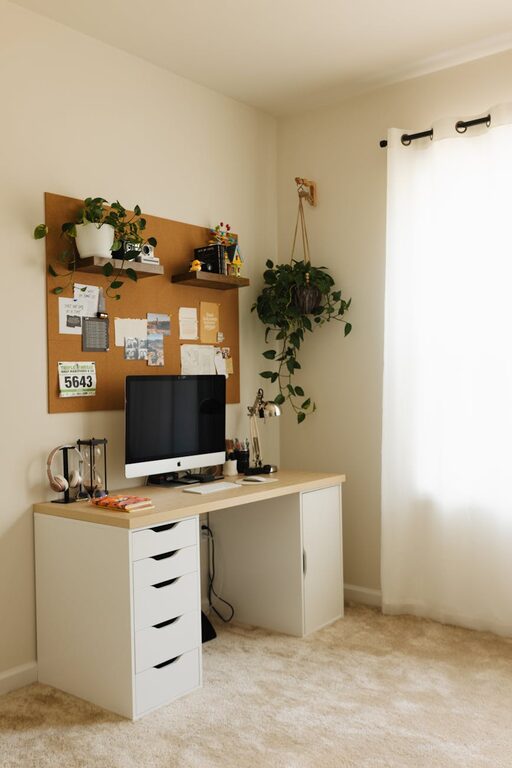
Working from home has become increasingly common, and having a space that is both relaxing and productive is essential for maintaining focus and wellbeing. Whether you’re freelancing, studying, or working remotely, your home workspace plays a big role in your daily comfort and efficiency. Here are some practical tips to help you create an environment that fosters concentration while keeping you calm and energised.
Choose the Right Location
Selecting the right spot for your workspace sets the foundation for comfort and productivity. Ideally, find a quiet area with minimal distractions.
– Natural light: Position your desk near a window if possible. Natural light helps regulate your circadian rhythm and reduces eye strain.
– Away from high-traffic areas: Avoid places where there is lots of noise or movement, such as near the kitchen or main hallway.
– Dedicated space: Even a small corner can work as long as it is reserved for work only, helping your brain associate the space with focus.
Invest in Ergonomic Furniture
Comfort is key when spending hours working at a desk. Ergonomic furniture supports your posture and reduces physical discomfort.
– Adjustable chair: Choose a chair that supports your lower back and allows your feet to rest flat on the floor.
– Desk height: Your desk should be high enough to keep your wrists straight and your elbows bent at around 90 degrees.
– Footrest: If your feet don’t reach the floor comfortably, a footrest can improve posture.
Keep It Clutter-Free and Organised
A tidy workspace minimises distractions and helps you stay focused.
– Declutter regularly: Remove unnecessary items from your desk at the end of each day.
– Use storage solutions: Drawers, shelves, and organisers keep essential supplies within reach without cluttering the surface.
– Digital organisation: Maintain an organised desktop and email inbox to reduce mental fatigue.
Incorporate Relaxing Elements
Adding calming features in your workspace supports mental wellbeing.
– Plants: Having greenery nearby can reduce stress and improve air quality.
– Soft colours: Choose soothing paint colours or accessories like cushions and rugs in calming shades.
– Personal touches: Photographs, artwork, or inspirational quotes that make you happy can boost your mood.
Manage Lighting Effectively
Good lighting not only reduces eye strain but also helps maintain energy levels throughout your workday.
– Layered lighting: Combine natural light with overhead lighting and task lamps to control brightness.
– Avoid glare: Position screens to avoid reflections and harsh light directly in your eyes.
– Adjustable lamps: Use lamps with adjustable brightness to suit different tasks and times of day.
Minimise Noise Distractions
Certain sounds can disrupt concentration, so it’s helpful to create a quieter environment.
– Noise-cancelling headphones: These are great for blocking out background noise and can even play calming music or white noise.
– Soft furnishings: Rugs, curtains, and cushions absorb sound and reduce echo.
– Close doors and windows: Limiting outside noise helps maintain a peaceful atmosphere.
Set Boundaries and Routines
Structure helps separate work time from relaxation and refreshes your mind.
– Set clear working hours: Define when you start and stop work to establish routine.
– Take breaks: Short, regular breaks help prevent burnout and maintain productivity.
– Inform household members: Let others know your schedule to minimise interruptions.
Optimise Your Technology Setup
A reliable and efficient technology setup helps reduce frustration and keeps your workflow smooth.
– Stable internet connection: Ensure your Wi-Fi is strong in your workspace or use a wired connection.
– Organised cables: Use clips or sleeves to keep cords untangled and out of the way.
– Essential accessories: Invest in a good keyboard, mouse, and screen to reduce strain.
Add Comfort with Temperature and Air Quality
Feeling physically comfortable helps keep you focused for longer periods.
– Ventilation: Ensure good airflow by opening windows or using fans.
– Temperature control: Use heaters or air conditioning to maintain a comfortable climate.
– Air purifiers: These can improve air quality if you work in an enclosed or dusty space.
Personalise Your Workspace Thoughtfully
While functionality is vital, making your workspace appealing encourages you to spend time there.
– Inspiring decor: Use colours and items that motivate you.
– Comfort items: Keep a stress ball, scented candle, or cosy blanket nearby.
– Music or sounds: Some people benefit from gentle background music or ambient noise apps.
—
Designing a home workspace that balances relaxation with productivity requires attention to environment, comfort, and organisation. By implementing these practical tips, you can create a place that not only supports your work tasks but also nurtures wellbeing. Remember, the best workspace is one that suits your personal needs and habits, so feel free to experiment until you find what works best for you.



More Stories
Simple Steps to Create a Relaxing Garden Space at Home
Tips for Creating a Productive Home Office Space That Boosts Focus and Comfort
Tips for Creating a Cosy Reading Nook in Your Home